

A power bank tossed into a hot car, buried under loose change, or left dead in a drawer can become a short-lived bargain. Knowing how to store power banks correctly helps them hold a charge longer, work when you actually need them, and avoid the safety problems that come with damaged lithium-ion batteries.
The good news is that proper storage does not require a special case or expensive accessories. A cool, dry spot, a sensible charge level, and a quick check every few months will handle most of the job.
Store power banks at a partial charge
For long-term storage, aim to leave a power bank at roughly 40% to 60% charge. You do not need to hit an exact number. If your model has four indicator lights, two lights is usually close enough.
Lithium-ion batteries age faster when they sit fully charged for months, especially in warm conditions. They also do poorly when left completely empty. A deeply discharged power bank may refuse to recharge, or its usable capacity may drop sharply.
There is a trade-off here. Keeping it near 50% is best for battery health, but it will not be ready to recharge your phone from zero during an unexpected outage. For a power bank you keep strictly for emergencies, storing it around 70% to 80% is a reasonable compromise. Check it more often than one stored at half charge.
Do not leave a power bank connected to a wall charger indefinitely. Most decent models stop actively charging when full, but heat and constant high charge still add unnecessary wear over time. It is not likely to fail overnight, but there is no real benefit to treating a power bank like a permanently plugged-in appliance.
Keep it cool, dry, and out of direct sun
Heat is the biggest everyday enemy of portable batteries. A closet shelf, desk drawer, or cabinet inside your home is usually fine. Avoid windowsills, garages that get hot in summer, attics, sheds, and glove compartments. A parked car can reach temperatures that are far beyond what a power bank is designed to handle.
Cold is generally less damaging during storage than extreme heat, but freezing conditions are still not ideal. Do not charge a power bank if it has been sitting in freezing weather. Let it return to room temperature first. Charging a very cold lithium-ion battery can cause permanent damage.
Humidity matters too. A power bank does not need a climate-controlled vault, but it should not live in a damp basement, bathroom cabinet, or near a kitchen sink. Moisture can corrode ports and internal components over time. If you live somewhere humid, keeping it in a clean drawer or lidded plastic bin is a simple, low-cost precaution.
Prevent metal objects from touching the ports
USB ports are recessed, but they are not invincible. Coins, keys, paper clips, and other loose metal items can cause a short circuit if they contact the right points inside a port. That is one reason a power bank should not be thrown loose into a bag or junk drawer.
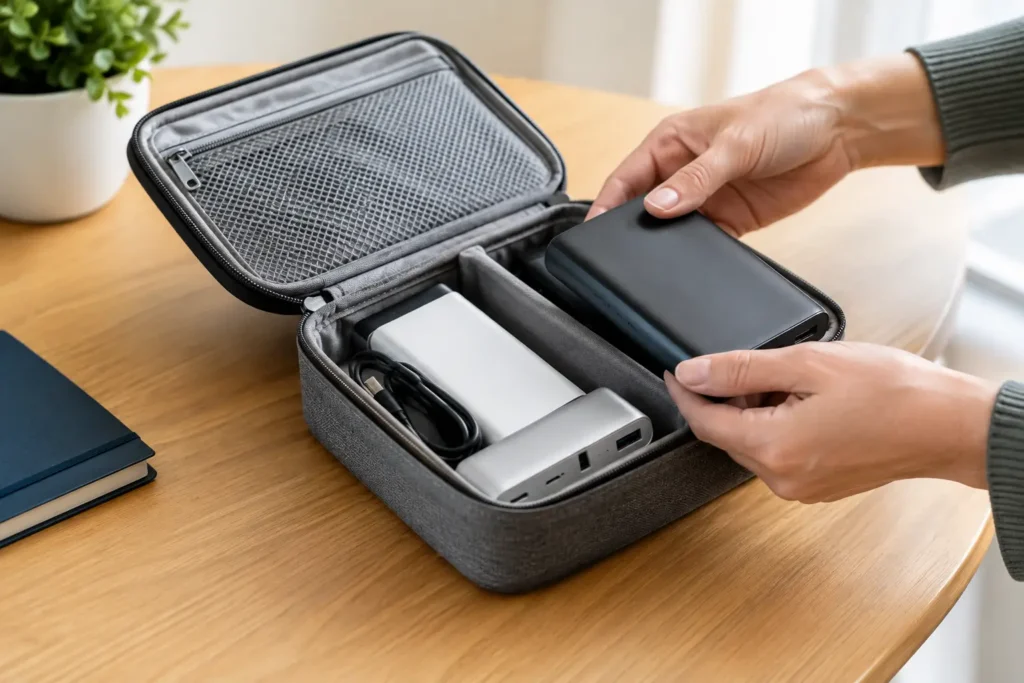
A small fabric pouch, zippered electronics case, or the original box works well. If you use a plastic storage bin, place the power bank where it will not slide around with cables, batteries, or tools. You do not need a fancy fireproof case for every phone charger, but basic physical protection is worth the small effort.
Avoid wrapping a power bank tightly in blankets, clothing, or other insulating material while charging or immediately after use. For storage at room temperature, a pouch is fine. The concern is trapped heat, not the pouch itself.
Keep charging cables separate when possible
Leaving a cable plugged into the power bank is not usually dangerous, but it creates avoidable wear on the port. A bent connector can loosen the port over time, particularly on cheap models with weak internal reinforcement.
Store the cable beside the power bank, not attached to it. Coil it loosely rather than folding it into sharp bends. If the cable is frayed, cracked, or loose at either end, replace it. A $5 cable is not worth risking a power bank, a phone, or an outlet.
This is also a good time to label cables if your household has a mix of USB-C, Lightning, Micro-USB, and USB-A accessories. The wrong cable will not usually hurt a modern USB device, but finding the right one quickly matters when a power bank is packed for travel or saved for an emergency.
Check stored power banks every three to six months
A power bank slowly loses charge even when nothing is connected. Lower-quality models often drain faster because their battery cells and standby electronics are less efficient. That does not automatically mean the unit is unsafe, but it does mean you should not store it for years and assume it will be ready.
Every three to six months, press the battery indicator button and check the charge level. Recharge it if it has dropped below roughly 20% to 30%, then unplug it once it reaches your preferred storage level. For an emergency power bank, test that it can charge a phone for a few minutes as well.
Use this inspection to look for physical damage. Stop using the power bank if you notice any of these warning signs:
- A swollen, bulging, cracked, or separated case
- Unusual heat while sitting unused or charging
- A chemical smell, leaking fluid, smoke, or discoloration
- Loose ports, exposed wiring, or a button that is pushed into the case
Do not try to squeeze a swollen power bank back into shape, tape a cracked case, or keep using it “until it dies.” Skip that one. Move it away from flammable materials and take it to an electronics or household hazardous-waste recycling location that accepts lithium-ion batteries. Do not put it in household trash or a curbside recycling bin.
Do not stack heavy items on top of it
Power banks are tougher than they look, but their battery cells can be damaged by crushing or repeated pressure. Avoid storing one under books, tools, canned goods, or a pile of heavier electronics. This matters even more for slim power banks, which may have less protection around the battery pack.
A dedicated small bin or a shallow drawer is better than the bottom of a crowded closet. If you carry one daily, give it its own pocket in a backpack rather than putting it in the same compartment as keys and chargers.
Be careful with rarely used and bargain-bin models
Affordable power banks can be good value, but low prices should not mean unknown brands, fake capacity claims, or no meaningful safety information. Storage will not fix poor battery cells or weak protection circuitry.
If a very cheap power bank loses most of its charge in a month, overheats, has unreliable ports, or shows a wildly inaccurate battery indicator, replacement is usually smarter than trying to nurse it along. A dependable 10,000mAh model from a recognizable budget brand is generally a better buy than a suspiciously cheap 30,000mAh unit with no clear specifications.
Age matters as well. Even a well-stored power bank gradually loses capacity. After three to five years, a frequently used model may no longer deliver enough charge to be worth carrying. If it still runs cool, holds a useful charge, and has solid ports, keep using it. If not, recycle it rather than relying on it during travel or a power outage.
Storage for travel and emergency kits
For travel, store your power bank in a pouch where you can reach it easily. Airlines generally require power banks to travel in carry-on luggage, not checked bags, because lithium-ion battery incidents are easier to manage in the cabin. Check your airline’s current capacity limits before flying, especially for larger units.
For an emergency kit, keep the power bank indoors in a stable location and write the last check date on a piece of tape or a small label. Store a known-good cable with it. A partially charged power bank with the right cable is far more useful than a fully charged one you cannot connect to your phone.
The best storage setup is simple enough that you will maintain it: a cool indoor drawer, no loose metal nearby, about half a charge, and a calendar reminder to check it a few times a year. That routine costs nothing and gives even a budget power bank a better chance of being worth your money when the outlet is not available.