

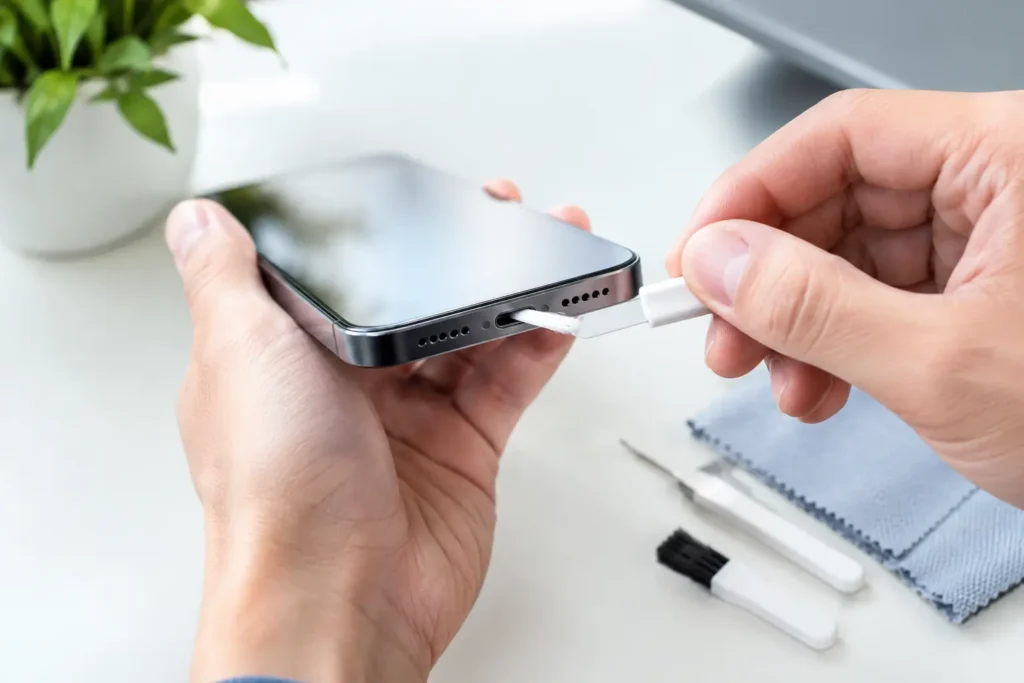
A phone that only charges when the cable is bent at a certain angle can make a perfectly good charger look broken. Before replacing cables, adapters, or even the phone, check the port. Pocket lint is one of the most common reasons a cable stops clicking into place. Knowing how to clean a phone charging port safely can save you money and prevent damage from aggressive DIY fixes.
Why a charging port gets clogged
Phone pockets, bags, and car cup holders are full of small debris. Each time you plug in a cable, the connector can push lint farther into the bottom of the port. Over time, it packs into a dense layer that prevents the plug from reaching the contacts correctly.
The usual warning sign is a cable that feels loose, falls out easily, or no longer seats with its usual firm click. Charging may start and stop, work only at certain angles, or fail completely. These symptoms can also come from a damaged cable, worn port, moisture exposure, or a software problem, so cleaning is a sensible first step, not a guaranteed cure.
What to use to clean a phone charging port
You do not need an expensive cleaning kit. In fact, many cheap kits include metal picks that are more likely to cause trouble than solve it. The safer, low-cost approach is to use a nonmetal tool and good lighting.
Have these items ready:
- A wooden toothpick, plastic dental pick, or plastic spudger with a very fine tip
- A bright flashlight or phone light
- A soft, dry brush, such as a clean small paintbrush
- Compressed air, used carefully and only as a finishing step
A wooden toothpick is often the best value choice because it is soft enough to reduce the risk of scratching internal contacts. Trim or split the tip if it is too thick for the port. Do not force it.
Skip paper clips, sewing needles, safety pins, tweezers, and metal SIM tools. A charging port contains small contacts that can bend or scrape. A metal tool can also create a short if the phone is powered on. This is one repair where being impatient can turn a free fix into an expensive one.
How to clean a phone charging port without damaging it
Start by turning the phone completely off. Remove the charging cable, case, and any accessories. If the phone recently got wet or shows a moisture warning, do not try to clean or charge it yet. Let it dry thoroughly first. Digging around in a damp port can make the situation worse.
Hold the phone so the charging port faces downward. This lets loosened debris fall out instead of getting pushed deeper inside. Use a flashlight to look into the port. You may see a gray or brown felt-like layer at the bottom. That is often compacted lint.
Gently insert the wooden or plastic tool along a side wall of the port. Avoid scraping the center contacts. On USB-C ports, the thin center tab is especially important and can be damaged if you press against it. On Lightning ports, work slowly around the inner edges rather than poking hard at the bottom.
Use light, short motions to lift debris outward. You are trying to tease lint loose, not drill into the port. Pull the tool out often and wipe it clean. Several small passes are safer than one hard scrape.
Once the larger debris is out, turn the port downward again and use a few short bursts of compressed air from a slight distance. Keep the can upright. Tilting it can spray cold liquid propellant into the port, which is not worth the risk. Do not hold the nozzle directly against the opening, and do not use a powerful air compressor.
Inspect the port again, then plug in a known-good cable. The connector should fit more securely than before. If it still feels loose but the port looks clean, stop digging. The issue may be wear or physical damage rather than remaining lint.
Should you use rubbing alcohol?
For ordinary dry lint, no. A dry wooden or plastic pick is safer and usually enough. Isopropyl alcohol is sometimes used by repair technicians for residue, but it is easy to overdo at home. Too much liquid can reach places it should not, and alcohol will not fix bent contacts or a worn-out port.
If there is visible sticky residue and you are comfortable working carefully, use only a tiny amount of high-percentage isopropyl alcohol on a lint-free swab or a barely dampened soft brush. Never pour liquid into the port. Leave the phone powered off until it is completely dry. For most people, professional cleaning is the better call when residue is involved.
What not to do when you clean a phone charging port
Do not blow into the port with your mouth. Breath carries moisture, and it can push debris farther in. Avoid vacuum cleaners too. Their static electricity and suction can be risky around delicate electronics.
Do not use water, household cleaners, WD-40, hand sanitizer, or adhesive putty. These shortcuts can leave residue, trap moisture, or damage plastics. Also skip online advice that recommends repeatedly plugging and unplugging the cable to clear lint. That usually compresses the debris further.
A new cable is not a cleaning tool. If lint is packed into the port, forcing a USB-C or Lightning plug against it can damage the connector end as well. Clean first, then test with the cable.
Test the cable and charger before you buy replacements
If cleaning does not solve the problem, test the least expensive parts first. Try a different cable that you know works reliably. Cables fail more often than wall adapters and phones, especially bargain cables with thin strain relief near the connector.
Next, try another charging adapter and another outlet. If your phone charges normally with a different cable, the original cable is the problem. Replace it with a certified or reputable option rather than the cheapest unbranded pack. Saving a few dollars is not good value if the cable overheats, fails quickly, or charges inconsistently.
If the phone supports wireless charging, test that too. A phone that charges wirelessly but not by cable may have a port issue. That does not always mean the port needs replacement, but it narrows down the likely cause.
Also check whether the problem happens with every cable. A cable that fits loosely in only one phone points to that phone’s port. A cable that fits loosely in several devices is probably worn out and should be replaced.
When cleaning is not enough
Stop trying to clean the port and consider a repair shop if you see bent pins, a cracked center tab, corrosion, blackened contacts, or any sign of burning. The same applies if the phone gets unusually hot while charging, repeatedly disconnects with several known-good cables, or will not charge after liquid exposure.
A port replacement can be worth paying for on a newer phone that otherwise works well. On an older budget phone with a weak battery, cracked screen, and charging trouble, repair costs can approach the value of the device. Get a repair quote before spending money, then compare it with the cost of a replacement phone. Wireless charging can be a temporary workaround for some models, but it is slower, less efficient, and not a real fix for a damaged port.
Keep the port cleaner going forward
You cannot keep a phone port spotless forever, but a little prevention helps. Avoid carrying your phone loose in lint-heavy pockets when possible, and check the cable tip before plugging it in. A case with a port cover can help for work, travel, or outdoor use, though it can be annoying for everyday charging.
The best habit is simple: when a cable stops clicking in firmly, inspect the port before buying new gear. A careful cleaning takes only a few minutes, costs almost nothing, and may keep a good phone and charger working longer.